

Canvas is an LMS used at many higher ED and K-2 institutions. The interactions we provide are:
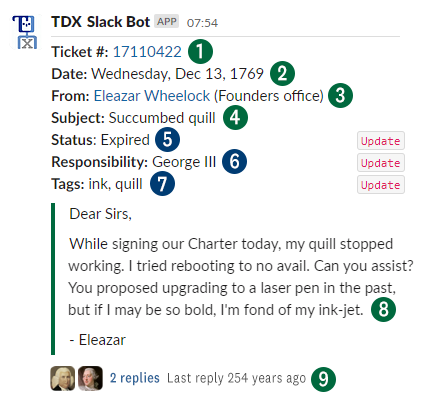
1. The ticket number is linked to the ticket within Team Dynamix.
2. Date/Time ticket was created.
3. The requester's name (linked to the user within Team Dynamix) followed by the user's department. In case the user is outside of the organization, the (non-linked) email address is shown.
4. Ticket subject.
5. 6. 7. (Coming summer '24) Automatic 2-way syncing of the ticket status, responsibility, and tags. These can be updated from within TDX or the Slack app.
8. Ticket message.
9. Internal message thread to quickly discuss a ticket with colleagues if needed.
TDX sends the ticket data to a Dartmoose webhook. Dartmoose processes this data and checks if a Slack channel (endpoint) is configured for the {AppID} and {ResponsibleGroupID}. If there is, Dartmoose prepares a compatible Slack message by converting HTML to Slack markdown, removing/converting unsupported characters, and truncating to the maximum Slack message length. This message is then sent to the TDX Slack Bot, which forwards the message and notification to your Slack channel.
When successful, a "Slack endpoint {ChannelID} reached successfully for {AppID} - {ResponsibleGroupID}" message is sent back upstream to TDX and logged.
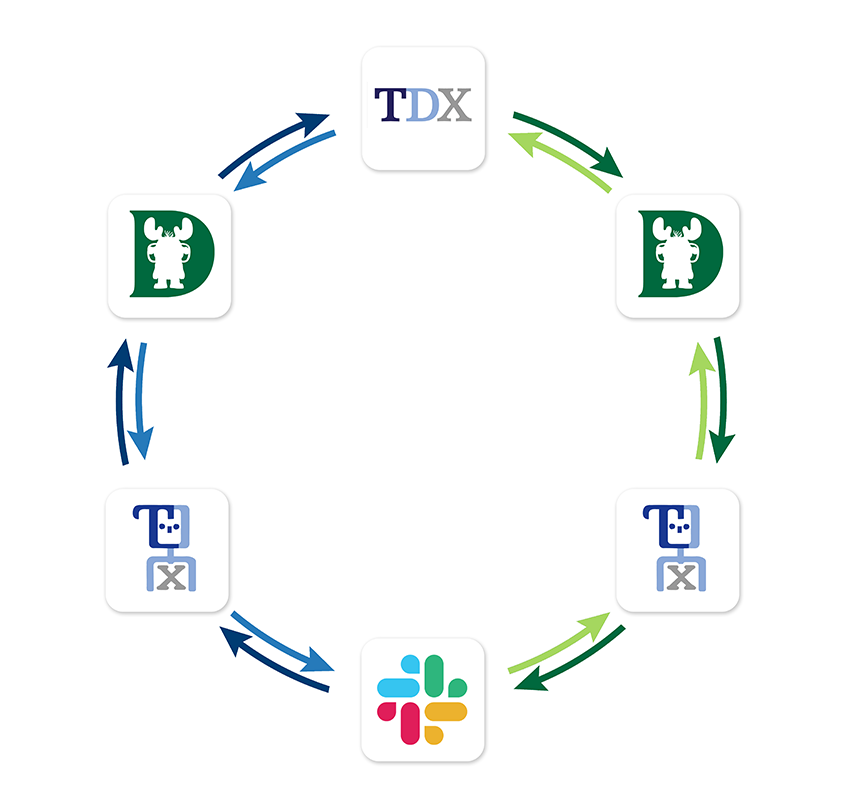
Coming in the summer of 2024, you can interact with TDX tickets from within Slack. Set the status, claim the ticket, and/or add tags right from within Slack. The changes will be sent through the TDX Slack Bot to Dartmoose. From there, they will be verified and applied to the ticket in TDX.
When successful, the changes will be applied to the Slack post, updating the current message to include the modified data.
 |
TDX Dartmoose TDX Slack Bot Slack app |
Coming in the summer of 2024, you can interact with TDX tickets from within Slack. Set the status, claim the ticket, and/or add tags right from within Slack. The changes will be sent through the TDX Slack Bot to Dartmoose. From there, they will be verified and applied to the ticket in TDX.
When successful, the changes will be applied to the Slack post, updating the current message to include the modified data.